



On March 24, 2026, the threat actor TeamPCP published two back-doored versions of the Python package litellm (versions 1.82.7 and 1.82.8) to PyPI.
The malicious versions contained a credential harvester targeting SSH keys, cloud credentials, Kubernetes secrets, and .env files, along with a Kubernetes lateral movement toolkit and a persistent systemd backdoor. Version 1.82.8 used a .pth file to execute the payload on every Python process startup in the environment, not just when litellm was imported.
Both versions have since been removed from PyPI. Full details are available in the Hacker News coverage.
How to check with Arnica
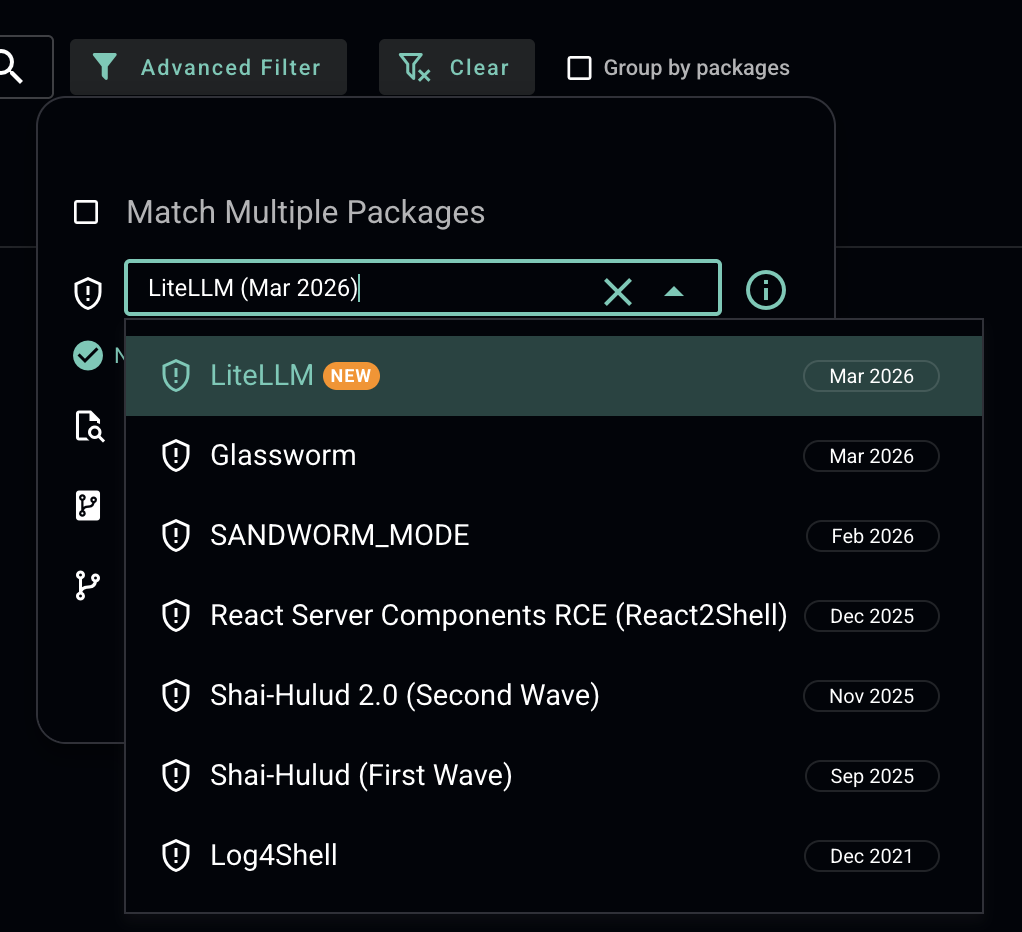
Arnica customers can search their SBOM for the impacted packages directly from the platform by filtering for "LiteLLM (Mar 2026)" in the advanced search:
Continuous sca scanning across all repositories — not just on pull requests — is what gives teams the speed to respond to incidents like this in minutes.
Recommended Actions
Not finding evidence in the SBOM is a good first step, but developers may have installed the package on their workstations outside of your tracked repositories. We recommend the following actions across all systems:
Ensure no impacted version (1.82.7 or 1.82.8) exists on any system, e.g. pip show litellm (Check all Python virtual environments on the system, not just the default one)
Inspect uv caches e.g. find:
~/.cache/uv - name "litellm_init.pth"If found, revert to a known-clean version and purge package manager caches (pip cache purge or rm -rf ~/.cache/uv)
Isolate affected hosts
Check for rogue node-setup-* pods in the kube-system namespace on any Kubernetes clusters
Review network logs for egress to:
models.litellm[.]cloud and checkmarx[.]zone Remove any persistence mechanisms (look for sysmon.service under systemd and ~/.config/sysmon/)
Rotate all potentially exposed credentials
Harden Your Pipeline with DepsGuard
Finding affected packages is essential, but hardening your pipeline against the next supply chain attack matters just as much.
Most npm, pnpm, yarn, and bun supply chain attacks succeed because of package manager security settings that exist but aren't enabled by default. One of the most effective is a cooldown period (also called minimum release age): a simple configuration that prevents your package manager from installing any package version published less than seven days ago. Most malicious packages are identified and removed within hours of publication, a 7-day cooldown stops them from reaching your pipeline entirely.
DepsGuard is a free, open-source CLI tool that automatically configures these protections across your stack. One command hardens npm, pnpm, yarn, bun, uv, Renovate, and Dependabot.
Cooldown enforcement via:
.npmrc, .yarnrc.yml, or .bunfig.toml
To block malicious install scripts:
ignore-scripts=true
pnpm-specific controls for provenance verification and transitive dependency trust.
No dependencies, MIT-licensed, with automatic backup before any file is modified. Run one command, review the interactive diff, and apply.
Start hardening your software supply chain in 60 seconds at depsguard.com.
Reduce Risk and Accelerate Velocity
Integrate Arnica ChatOps with your development workflow to eliminate risks before they ever reach production.