


How to Evaluate Agentic Pentesting Tools: Metrics, Benchmarks and the Questions to Ask
Nearly every AI pentesting vendor now has a benchmark, and most of them win it. In May 2026, Doyensec published an independent comparison of two AI pentesting platforms on two open-source apps, Fider and Photoview. Within five months, at least three other vendors had run their own tools against the same apps and published results that put themselves on top.
The benchmarks still have value. You just need to know which numbers to trust, which to discount, and what to test yourself.
It also helps to know what you’re comparing. “AI pentesting” is a broad term. Some tools use AI to write payloads, summarize scanner output or suggest next steps while a person or a fixed script drives the test. Agentic pentesting hands the agent the objective. It plans and chains multi-step attacks against a live system, adapts to each response, and comes back with every finding confirmed or debunked. A product labeled “AI” may still be a scanner underneath, so check for that difference in every tool you evaluate.
If you’re comparing AI pentesting tools, this guide covers the metrics that hold up, the operational details that sink a rollout, and the questions to ask before you commit to a proof of concept. If you need the fundamentals first, start with what agentic pentesting is and how it works.
TL;DR
- Finding counts are the easiest number to inflate. Weight your evaluation toward validated, high-severity findings with working reproduction steps.
- Ask who validated each result. In the public Fider and Photoview benchmarks, only one study used an outside reviewer, and a vendor paid for it.
- Precision was close across tools. Severity accuracy and report quality varied far more.
- Operational fit decides most rollouts: setup time, SSO and multi-user support, damage to the target, and how fast a report arrives.
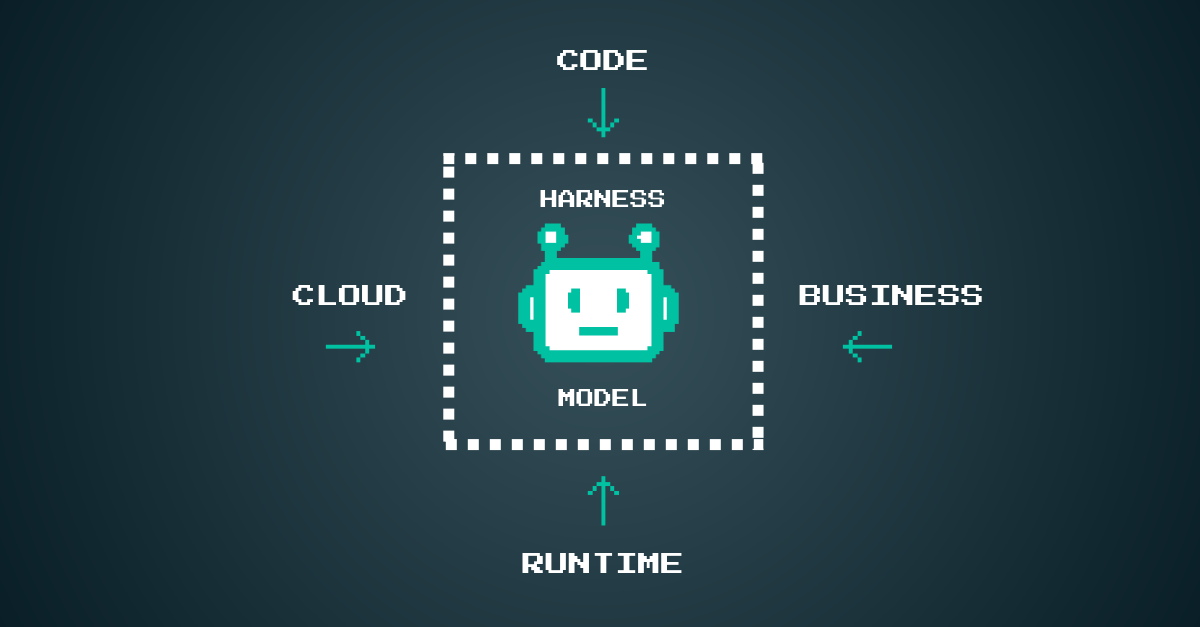
- The model matters less than the harness and the context around it. Ask what the agent knows about your code, cloud and business before it starts.
- Run your own bake-off on an app you know, with known bugs as ground truth, and score every tool the same way.
Why Evaluating Agentic Pentesting Tools Is Harder Than It Looks
A traditional pentest is hard to judge from the outside. You get a report, and unless you hired a second firm to test the same app, you have no idea what was missed. Agentic pentesting makes side-by-side testing cheaper, which is why public benchmarks have multiplied. It has not made them easier to read.
The Fider and Photoview Benchmarks
Doyensec picked Fider (a Go feedback portal) and Photoview (a photo gallery) at random from 442 self-hostable open-source apps. Because the versions and setup are public, other vendors have reused them.
Each follow-up study reports its own tool ahead on the metric it leads with: total findings, severity-weighted score, cost or speed. Each also notes, to its credit, that the comparison is directional rather than controlled.
Three Ways a Benchmark Can Mislead
- Different validators. A finding confirmed by an outside reviewer and one confirmed by the vendor's own team are different evidence classes. Invicti's write-up separates them explicitly, which is a good model to copy.
- Training-data recall. Deliberately vulnerable apps such as OWASP Juice Shop have thousands of public write-ups. Escape reported that a bare frontier model kept pace there but found far less on Fider and Photoview, and was seen looking up public write-ups mid-run on a purpose-built test app. A score on a well-known target can measure memory, not discovery.
- Padding and duplicates. One root cause can show up as several findings. Doyensec found seven findings in one Fider report that shared a root cause, and lowered the severity of 11 of 32 findings in one Photoview report, most of them to informational.
The Metrics That Matter When Comparing AI Pentesting Tools
Read results from the hardest metric to game to the easiest. Escape put it well: total findings are the easiest number to inflate, severity distribution is harder, and high-severity count is hardest of all.
1. Validated High-Severity Findings
Start with confirmed critical and high findings, after severity has been checked by someone other than the tool. These are the issues that change a release decision. A tool that reports 30 findings, 25 of them informational, gives you less than one that reports 12 with four proven authorization bypasses.
If you can, compare against ground truth. Hacktron checked its Fider results against the security fixes Fider's maintainers had since shipped, and reported which ones it caught and missed. That is a stronger test than any raw count.
2. Severity Accuracy
Every public study found that agents overstate severity. Doyensec judged about 69% of one platform's severities correct and 68% of the other's. Hacktron's CTO reported that only 22% of his own tool's severities matched his review. Inflated severity has a real cost: a hallucinated critical can trigger incident response and burn engineering time, which erodes trust in the program.
Ask each vendor how severity is assigned, whether it accounts for business context (what data is sensitive, which roles matter), and whether your team can override it.
3. Precision and False Positives
False-positive rates in the published studies were low and close together: 2 false positives in 49 findings for one platform and 1 in 31 for the other in Doyensec's study. Precision is necessary but no longer a strong differentiator on its own. What separates tools is how each result is proven. Ask whether every finding comes back confirmed or debunked, with the exact steps the agent took.
4. Coverage Breadth
The two platforms Doyensec tested agreed on only three Fider findings and four Photoview findings. Low overlap means each tool has blind spots. Ask vendors which vulnerability classes they test for, and look for gaps in authorization, business logic and multi-step chains, where scanners have always been weakest.
5. Evidence Quality
A finding your team cannot reproduce is a ticket nobody closes. Doyensec flagged reproduction steps that did not work, payloads truncated in PDFs and a report with inconsistent finding counts and no finding IDs. Check that each finding includes request and response evidence, working reproduction steps and, where source is available, the file and line.
Operational Criteria: What Breaks a Rollout
Finding quality decides whether a tool is worth buying. Operations decide whether it gets used. In Doyensec's study, the gap between the two platforms on findings was incremental, while the gap in operations was stark.
Setup and Time to First Test
One platform took under 20 minutes to configure both scans. The other needed sales approval, a DocuSign order form and several days before testing began, and one test took more than a week with over 22 support emails. Ask for a self-serve trial, or at least a clear timeline from signed order to first report.
Authentication and Multi-User Testing
Authorization bugs, like one user reading another tenant's data, are some of the highest-impact findings in modern apps. An agent can only find them if it can log in as more than one user. Doyensec reported that one platform did not support social login or multiple test accounts, and was run with a single admin account. Ask whether the tool supports:
- SSO and OAuth flows, MFA and magic-link or one-time-code logins
- At least two roles at once, such as an admin and a low-privilege user
- Apps on internal networks, behind a VPN
Safety and Blast Radius
An agent that attacks a live system can damage it. In Doyensec's study, one agent changed the app's login mechanism, deleted the test account and exhausted the server's resources twice. The app sent more than 4,800 emails during testing. Ask about:
- Scope verification, such as proving domain ownership before a test can run
- Rate limits, test windows and endpoints you can block
- Where the agent runs, whether it is isolated, and what budget caps each run
- Whether a person can watch the agent live and take over
Speed and Report Delivery
Published run times ranged from under an hour to more than a week of calendar time. Speed matters most when you want to test before a merge, not just once a quarter. Ask for typical run time on an app your size, and whether the report is ready when the run ends or goes through a manual review queue.
Pricing and Retesting
Pricing models vary: fixed tiers per test, credits sized by app complexity, or usage-based pricing tied to compute. Retest terms vary too. Doyensec noted unlimited retests within 90 days on one platform and a single retest within 30 days on the other. Model cost per app per year at the cadence you actually need, including retests after fixes.
Context and SDLC Fit: The Questions Benchmarks Don't Answer
Public benchmarks test one app, once, in isolation. Your program tests many apps, every time they change. Two factors matter more in that setting than any single score.
What the Agent Knows Before It Starts
The model is the easiest part to acquire. Escape ran the same frontier model with and without its harness and reported about four times as many findings with the harness on unfamiliar code. Hacktron and Invicti both describe routing work across several models and agents. The difference between tools is increasingly the harness and the context fed into it.
Ask what context the agent draws on:
- Source code: SAST, AI SAST, SCA, secrets and IaC findings that show which code paths look dangerous and which vulnerable dependencies are reachable
- Cloud: configuration across AWS, Azure, GCP and containers that shows what is exposed
- Runtime: the live application, its traffic and DAST results
- Business: architecture diagrams, design docs, threat models and the workflows that matter most
A runtime-only agent sees endpoints and responses. An agent with code and business context starts from real hypotheses and can judge whether a finding matters to your product. That also helps with the severity problem above.
Runtime context catches what source can’t. Java4Shell (CVE-2026-114938) lives in the JVM itself, so it never shows up in a manifest or a source-built SBOM. Read how to find it.
Black-Box and White-Box Modes
Some teams cannot share source for vendor code or IP reasons. Ask whether the tool supports both modes and what each produces. Escape reported the same high-severity counts in both modes on Fider and Photoview, with source access adding mostly medium and low findings. Test both on your own apps before you assume either is enough.
Where Testing Fits in the SDLC
Testing more often does not fix a timing problem on its own. If exploitability is only proven after a production deploy, the vulnerable code has already merged.
Ask:
- Can tests run on a preview or staging environment before merge?
- Can a test focus on what changed, rather than rerunning the whole app?
- Do code findings from AI SAST become the agent's starting hypotheses?
- Does a confirmed finding route to the developer who made the change?
- Does the tool retest automatically after a fix and record that the fix held?
Read more: How to Secure The Software Development Lifecycle
How to Run Your Own Agentic Pentesting Proof of Concept
The most reliable benchmark is one you run on your own app, scored by your own team. Doyensec published its full method, which makes a good template.
- Pick a target you know. Use a real internal app with several user roles, or a public app such as Fider 0.33.0 or Photoview 2.4.0 so you can compare against published results.
- Build ground truth. List bugs you already know about: past pentest findings, fixed security issues, or bugs you seed yourself. Avoid well-known training apps like Juice Shop.
- Hold conditions equal. Give every tool the same version, accounts, source access, scope and time budget. Record any setting you change.
- Deploy on throwaway infrastructure. Expect test data, emails and resource use. Back up the database and cap outbound email.
- Validate every finding yourself. Mark each one true or false positive, re-score severity in your context, and merge duplicates that share a root cause.
- Time the work. Track setup time, run time, time to report and the hours your team spent validating.
- Score with fixed weights. Agree on the scorecard before results come in.
Sample Scorecard
Adjust the weights to your program. A team that ships many times a day might weight SDLC fit and speed higher. A regulated team might weight evidence quality and safety higher.
> Create your own or use our scorecard to weigh the tools against one another.
Final Thoughts on Choosing an Agentic Pentesting Tool
Public benchmarks are a good place to start and a poor place to finish. The numbers that hold up are validated high-severity findings, honest severity and evidence your developers can act on. The details that decide adoption are setup, multi-user auth, safety and how well testing fits the way you ship.
Arnica Agentic Pentesting was built around those criteria. It brings code, cloud, runtime and business context together to prove which risks are exploitable. Domain verification is required before testing. Runs execute in an isolated sandbox with a budget per run, a person can watch the agent live and take over, and every finding comes back confirmed or debunked with the steps the agent took. It is available now in a controlled rollout.
Putting together a shortlist? Book a demo and bring your scorecard, or read the launch announcement.
Frequently Asked Questions
How do I evaluate agentic pentesting tools?
Run a proof of concept on an app you know, with known bugs as ground truth, and give every tool the same version, accounts and scope. Validate each finding yourself, then score tools on validated high-severity findings, evidence quality, severity accuracy, precision, auth support, safety, speed and SDLC fit, using weights agreed before results come in.
Can I trust vendor AI pentesting benchmarks?
Treat them as directional. Check who validated the findings, whether the target app has public write-ups the model may have memorized, and whether duplicates and informational findings were counted. Studies with an outside reviewer and a published method, such as Doyensec's Fider and Photoview comparison, are the most useful starting point.
What is a good false-positive rate for an AI pentesting tool?
In Doyensec's independent study, both platforms had false positives in the low single digits as a share of true positives: 2 in 49 and 1 in 31. Since precision is now close across tools, also check severity accuracy and whether each finding includes working reproduction steps.
Why does multi-user testing matter for agentic pentesting?
Authorization flaws, like one user reading another user's or tenant's data, only show up when the agent can act as more than one identity. A tool limited to a single account, especially an admin account, can miss them entirely.
Is a bigger AI model the same as a better pentesting tool?
No. The harness and context around the model matter more on unfamiliar code. Escape reported about four times as many findings when the same frontier model ran inside its harness, and the bare model did best only on apps with public write-ups.
Should agentic pentesting run before or after deployment?
Both. Testing in a preview or staging environment before merge proves exploitability while the fix is cheapest and the change is fresh. Testing after deployment catches drift in configuration and infrastructure, and retesting after a fix confirms it held.
Bring your scorecard to a demo
See how Arnica Agentic Pentesting does against the criteria in this guide: validated high-severity findings, multi-user auth, safety controls and evidence your team can reproduce.
Try Arnica and activate your pipelineless security in seconds.
Address 92% of risks before they ever reach production.
Book a demo